TradLife_A Cashflow#
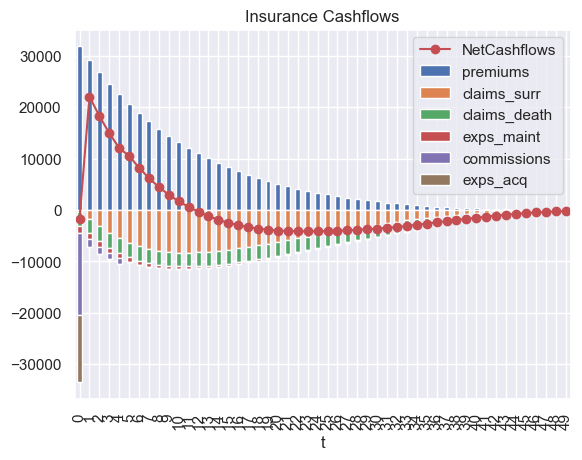
This notebook calculates the cash flows of a sample whole life policy with the TradLife_A model in the :mod:~annuallife library. It then outputs a graph depicting the net cash flows, along with a breakdown of the cash flow components.
Click the badge below to run this notebook online on Google Colab. You need a Google account and need to be logged in to it to run this notebook on Google Colab. 
The next code cell below is relevant only when you run this notebook on Google Colab. It installs lifelib and creates a copy of the library for this notebook.
[1]:
import sys, os

if 'google.colab' in sys.modules:
    lib = 'annuallife'; lib_dir = '/content/' + lib
    if not os.path.exists(lib_dir):
        !pip install lifelib
        import lifelib; lifelib.create(lib, lib_dir)

    %cd $lib_dir
[2]:
import modelx as mx
import pandas as pd
import seaborn as sns
sns.set_theme(style="darkgrid")

# PolicyID 171 in simplelife corresponds to idx 170 (0-based array
# index) in TradLife_A.
idx = 170
proj = mx.read_model("TradLife_A").Projection[idx]

# Draw NetCashflows Graph
data = {'NetCashflows': [proj.net_cf[t] for t in range(50)]}
ax = pd.DataFrame(data).plot.line(marker='o', color='r')

# Draw components of net cashflows
vars = ['premiums',
        'claims_surr',
        'claims_death',
        'exps_maint',
        'commissions',
        'exps_acq']

for cells in vars:
    list(proj.cells[cells](t) for t in range(50))

df = proj.frame[vars].sort_index().dropna().droplevel(['x', 'y', 'basis'])
df.index = df.index.astype(int)

df[vars[1:]] = df[vars[1:]].mul(-1)   # Change outflows to negatives
df.plot(kind='bar', stacked=True, ax=ax, title='Insurance Cashflows')
[2]:
<Axes: title={'center': 'Insurance Cashflows'}, xlabel='t'>