The TradLife_A Model#
Annual new business projection model of basic traditional life policies.
Overview#
TradLife_A is an annual new business projection model
of basic traditional life policies, covering term, whole life and
endowment products, built with
modelx.
It projects liability cashflows and their present values for policies represented by model points. Projected items include:
Premiums,
Commissions and expenses,
Claims.
Premiums are calculated using commutation functions. Cells for investment income reserves are defined but not implemented.
Computation flow#
Model point data, product specifications, assumptions and economic scenarios are all held in an external Excel workbook, input.xlsx.
The spaces are wired together as shown below, and the computation proceeds as follows.
        graph LR
    Projection --> PolicyAttrs
    Projection --> Assumptions
    Projection --> CommTable
    Projection --> Economic
    PolicyAttrs --> InputData
    Assumptions --> InputData
    CommTable --> InputData
    Economic --> InputData
The data is read into the model from the input file in
InputData, and held there aspandasDataFrames and dicts.InputDatais referenced byPolicyAttrsandAssumptions, where policy attributes and assumptions are mapped to model points.InputDatais also referenced byEconomic, where discount rates are calculated.CommTablecalculates commutation functions, and defines actuarial notations. They are used byProjectionto calculate the premium rate for each model point. Mortality rates are provided throughInputData.CommTabletakes three parameters,Sex,IntRateandTable(sex, interest rate and mortality table id).Projectioncarries out the projection by model point. It takes two parameters:idx(mandatory) to identify a model point, andscen_id(optional) to select the economic scenario, defaulting to 1. Policy attributes and assumptions are received from cells inPolicyAttrsandAssumptions, which return their values by model point in 1-Dnumpyarrays, so theidxparameter indicates the array index, starting from 0.The projection logic is not defined directly in
Projection. Instead, the space inherits all of its logic from two base spaces,BaseProjandPV.
For example, the present value of net cashflows for the first model point is obtained as:
>>> m.Projection[0].pv_net_cf(0)
Model Structure#
In TradLife_A, the following spaces are defined.
Space |
Description |
|---|---|
Reads input.xlsx and holds its named ranges as |
|
Parametric space holding scenario-dependent economic assumptions;
parameter |
|
Base space of |
|
Base space of |
|
Parametric space whose dynamic ItemSpaces carry out projections
for each model point; parameters |
|
Holds assumption parameters and rates used by
|
|
Holds policy attributes and policy-level values such as premium
and surrender rates used by
|
|
Base space of |
|
Parametric space providing commutation functions and actuarial
notations; parameters |
|
Container for the enum types used across the model. |
Enums contains the enum types as child
spaces, and Assumptions contains an
AsmpID child space.
Inheritance#
Projection inherits from
BaseProj and
PV, so projection cells and their
present-value counterparts share the same parameter scope.
Assumptions and
PolicyAttrs inherit from
Utilities, which contributes the
pandas_to_array and map_to_policies helpers.
        %%{init: {"class": {"hideEmptyMembersBox": true}}}%%
classDiagram
    BaseProj <|-- Projection
    PV <|-- Projection
    Utilities <|-- Assumptions
    Utilities <|-- PolicyAttrs
Cross-space references#
The cells in Projection and its base
spaces resolve a number of References to other spaces:
scen->Economicasmp->Assumptionspol->PolicyAttrscomm_table->CommTable
Economic,
Assumptions,
PolicyAttrs and
CommTable each reference the
InputData space as input_data.
CommTable reads its mortality tables
through mortality_tables().
        graph LR
    Projection -- scen --> Economic
    Projection -- asmp --> Assumptions
    Projection -- pol --> PolicyAttrs
    Projection -- comm_table --> CommTable
    Economic -- input_data --> InputData
    Assumptions -- input_data --> InputData
    PolicyAttrs -- input_data --> InputData
    CommTable -- input_data --> InputData
Input File#
TradLife_A reads its data from input.xlsx, which is
located next to the TradLife_A model directory inside the library
folder. The default file name is set by the
input_file_name reference.
The workbook defines the named ranges described below. Each one is read
through a Cells in InputData.
See also
InputData for the Cells that load these
named ranges and the helpers that turn them into pandas
objects.
Model point data#
Named range: PolicyData
Per-policy attributes for the model points the projection runs over.
One row per policy, loaded by
policy_data() and indexed by
the Policy column.
Column |
Description |
|---|---|
|
Policy ID. Becomes the DataFrame index. |
|
Product code ( |
|
Policy-type sub-category within the product. |
|
Product generation / cohort identifier. |
|
Distribution channel. |
|
Elapsed policy duration in years at the projection start. |
|
Insured sex ( |
|
Age at policy issue. |
|
Premium payment mode (number of payments per year). |
|
Premium-paying period in years. |
|
Term of the policy in years. |
|
Maximum policy term used to cap term-dependent items. |
|
Number of policies represented by the model point. |
|
Sum assured per policy. |
Product specifications#
Named range: ProductSpecTable
Per-product specification table holding loading parameters, surrender
charges and the mortality, interest and lapse references used on the
premium and valuation bases. Read column-by-column by
product_spec(), which returns
each column as a Series keyed by Product / PolType / Gen.
Column |
Description |
|---|---|
|
Lookup keys. |
|
Linear parameters of the sum-assured-based acquisition loading,
with |
|
Sum-assured-based maintenance loadings during and after the premium-paying period. |
|
Linear parameters of the premium-based maintenance loading,
with |
|
Parameters of the initial surrender charge, with |
|
Mortality table ID (column of |
|
Interest rate for |
|
Annual lapse rate for |
|
Optional commutation-function parameters for products that need them (left blank for products that do not). |
Assumption parameters#
Named range: AssumptionTable
Table of actuarial assumption parameters — mortality and lapse
references, commission rates, expense factors, and tax/inflation
rates — keyed by Product / PolType / Gen. Read
column-by-column by
assumption(), which returns each
column as a Series. Rows are sparse: a product-level row sets the
defaults, and more specific (PolType / Gen) rows override
individual columns.
Column |
Description |
|---|---|
|
Lookup keys for the assumption set. |
|
Base mortality table ID (column of |
|
Name of the |
|
Name of the |
|
Renewal-premium retention assumption. |
|
Assumed investment return. |
|
First-year and renewal-year commission rates as a fraction of premium. |
|
Number of renewal years over which |
|
Acquisition expense factor per |
|
Maintenance expense factor per |
|
Expense inflation rate applied to maintenance expenses. |
|
Consumption-tax rate applied to expenses. |
Assumptions by duration#
Named range: AsmpByDuration
Duration-indexed tables of mortality factors, morbidity rates, and
lapse rates. Read by
assumption_tables(), which
returns a DataFrame indexed by Year. Columns of this range are
referenced by name from AssumptionTable (e.g. MortFactor and
Surrender).
Column |
Description |
|---|---|
|
Policy duration in years; becomes the DataFrame index. |
|
Duration-based mortality-factor tables ( |
|
Duration-based morbidity-rate tables ( |
|
Duration-based lapse-rate tables ( |
Mortality tables#
Named range: MortalityTables
Mortality rates by attained age and (mortality table ID, sex), with a
two-row header (MortTable over Sex). Read by
mortality_tables(), which
returns a DataFrame indexed by age with a column MultiIndex of
(MortTable, Sex).
Column |
Description |
|---|---|
|
Attained age in years. |
|
Mortality table ID (integer); referenced by |
|
Sex code ( |
Cell value |
Annual mortality rate for the (table, sex, age). |
Economic scenarios#
Named range: Scenarios
Read by scenarios(), which
returns a DataFrame indexed by (ScenID, Year).
Column |
Description |
|---|---|
|
Scenario ID. Selected through the |
|
Time index (year) within the scenario. |
|
Annual interest rate at time |
Constant parameters#
Named range: ConstParams
Two-column range of scalar parameters used across the model. Read as a
dict by const_params().
Column |
Description |
|---|---|
First column |
Parameter name (e.g. |
Second column |
Parameter value. |
Basic Usage#
Reading the model#
Create your copy of the annuallife library by following the steps on
the Quick Start page. The model is saved as the folder
TradLife_A in the copied folder, with input.xlsx placed next to
it.
To read the model from Spyder with the modelx plug-in, right-click on the empty space in MxExplorer, select Read Model, and choose the TradLife_A folder.
To read the model on an IPython console, use read_model after
changing the current directory to the library folder so the workbook is
discoverable:
>>> import modelx as mx

>>> m = mx.read_model("TradLife_A")
Running results#
Projection results are obtained by calling the cells of an ItemSpace of
Projection with a specific idx (and
optionally scen_id):
>>> m.Projection[0].pv_net_cf(0)            # PV of net cashflow at t=0
>>> m.Projection[0].net_cf(5)               # Net cashflow at t=5
>>> m.Projection[0].premiums(0)             # Premium income at t=0
>>> m.Projection[0].claims(0)               # Death claims at t=0
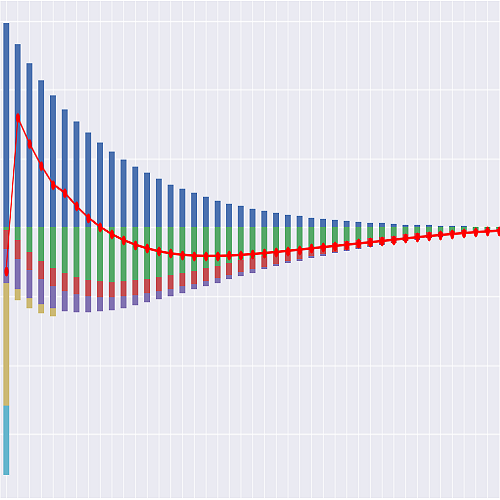
The plot scripts plot_tradlife_a.py and plot_pvcashflows_tradlife_a.py
in the library folder demonstrate how to produce stacked-bar charts of
the cashflow components and their present values.
Exporting the model#
The model can be exported to a pure-Python (nomx) module that does not
depend on modelx. Use the export method on the model object:
>>> m.export("TradLife_A_nomx")
This command exports the model as a Python package named
TradLife_A_nomx in the current directory. You can test the exported
(nomx) model by importing it and accessing its cells:
>>> from TradLife_A_nomx import mx_model

>>> mx_model.Projection[0].pv_net_cf(0)
(Here, mx_model is the nomx model object.)
Global References#
Global references are names that can be referenced from formulas in any
space in the model. The third-party modules
pandas and
numpy are defined here, as are the enum types
defined as child spaces under Enums.
- ProductID#
The product-type enum,
ProductID(TERMterm insurance,WLwhole life,ENDWendowment).
- SexID#
The sex enum,
SexID(Mmale,Ffemale).
- RateBasisID#
The rate-basis enum,
RateBasisID(PREMpremium basis,VALvaluation basis).